📣 How to Shout-out and Send Kudos Anonymously in Slack
Direct Answer / Summary:
To send anonymous peer recognitions and Kudos in Slack, install OpenSay from opensay.co (free tier available) and type /anon shoutout. Pick a teammate, select positive praise tags, and submit. OpenSay uses AI to verify positive sentiment and generates an image recognition card in the channel.
Anonymous shout-outs allow team members to recognize, praise or give kudos to others. They look like this:

We use AI to allow only for positive sentiment.
The 🌈 Karma in the image is dynamically updated which makes it easy to download and embed the shout-out in presentations, documents, etc.
You can shout-out anonymously in Slack in three ways:
-
Type
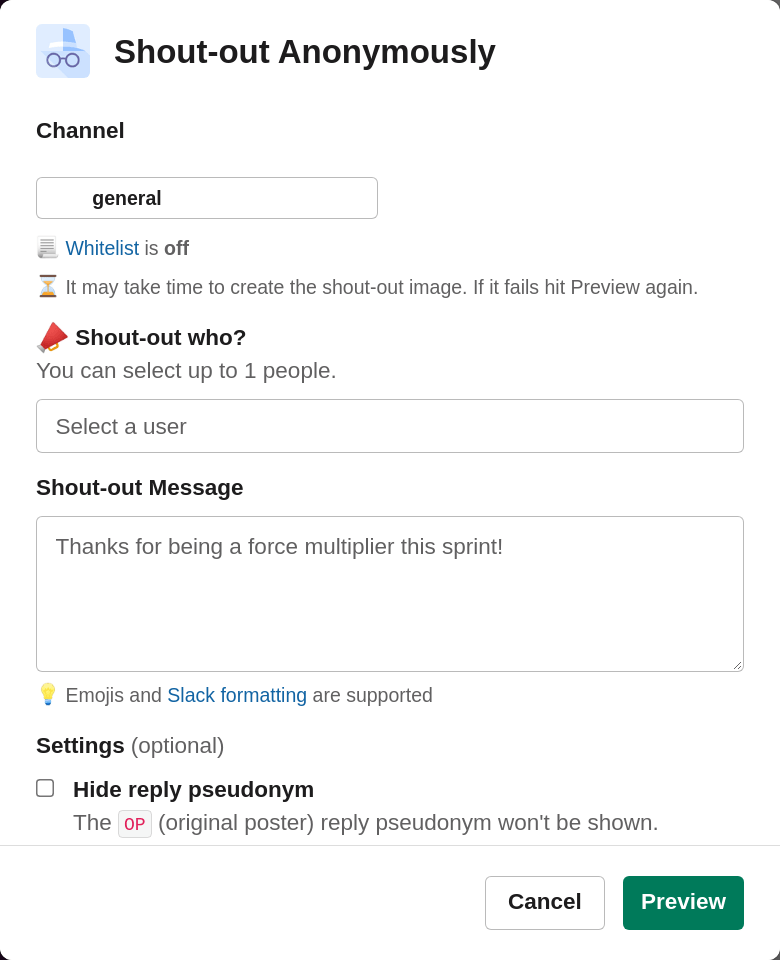
/anon shoutout, choose a channel, select a person to shout-out to and type your message. -
Type
/anon, click on Shout-out Anonymously (or simply type/anon shoutout). -
Click the ⚡ (shortcuts button) and choose Shout-out Anonymously.
The shout-out dialog looks like this:
Ready to use this in your Slack workspace?
Install OpenSay to enable anonymous messages, polls, whispers, and psychological safety in Slack in under 60 seconds.