⏱ Automating Scheduled Engagements and Retros in Slack
Direct Answer / Summary:
To run automated feedback check-ins in Slack, install OpenSay at opensay.co (free tier & trial available) and configure Scheduled Engagements in the dashboard. OpenSay automatically posts recurring prompts, AMAs, or retrospectives to designated channels at scheduled intervals.
Scheduled Engagements allow teams to periodically ask for anonymous feedback. You can learn more on why it is helpful in this blog post.
Scheduled Engagements are basically Slack messages that look like:
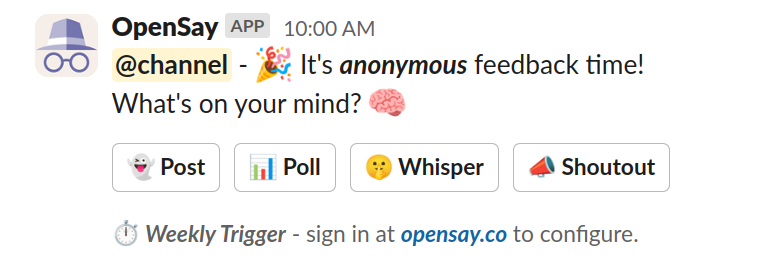
Note that @channel is being mentioned only if the Notify channel checkbox is checked.
You can easily add Scheduled Engagements to your Slack workspace by:
- Make sure you have OpenSay installed, if not - click "Add to Slack" at opensay.co.
- Sign-in with Slack at app.opensay.co and scroll to the Scheduled Engagements section.
- Add new Scheduled Engagements, it is quite self-explanatory:
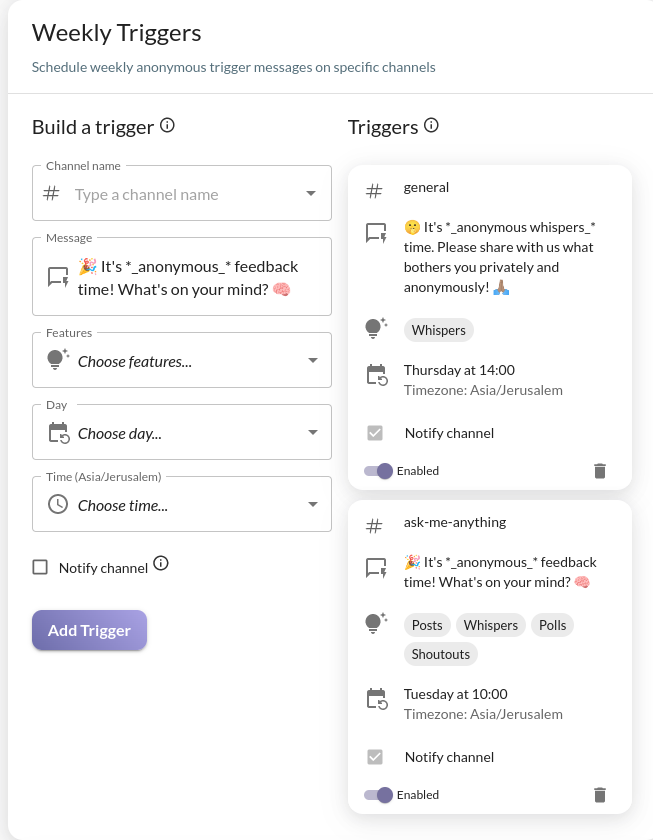
Feel free to reach out to us or schedule a demo for help is needed.
Ready to use this in your Slack workspace?
Install OpenSay to enable anonymous messages, polls, whispers, and psychological safety in Slack in under 60 seconds.